Illuminate Your Artwork with the Illustrator Neon Effect
Capturing the electric buzz of a city at night or the retro charm of a classic diner sign often feels out of reach for digital artists. We often struggle to replicate that specific "glow" that makes neon signage so captivating. Enter the Illustrator Neon Effect, a specialized graphic style collection designed to bridge the gap between standard vector design and luminous, eye-catching artwork. This isn't just a filter; it is a toolkit for adding instant atmosphere and energy to your projects.
The Anatomy of a Realistic Glow
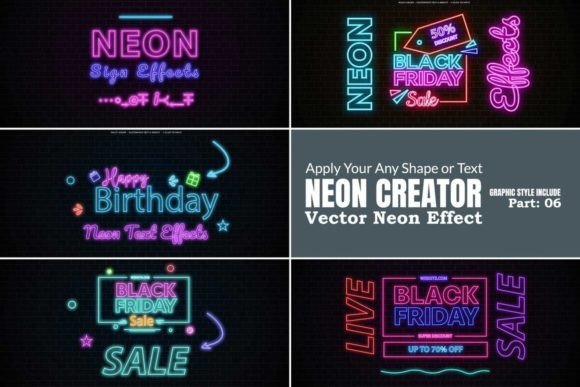
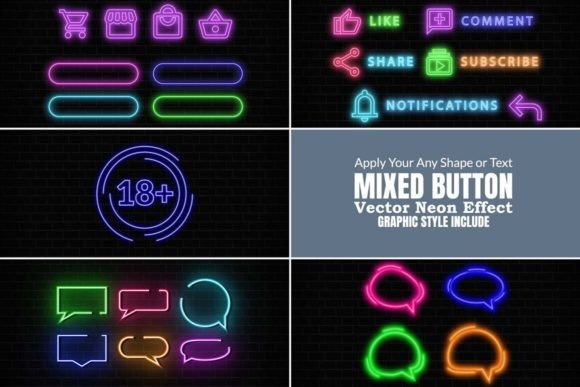
When we talk about a neon effect, we are discussing more than just a bright color. True neon has depth, falloff, and a sense of light interacting with the environment. The Illustrator Neon Effect collection achieves this through carefully constructed graphic styles. These styles utilize multiple layers of strokes, gradients, and blending modes to simulate the way light bleeds into the air. The result is a vibrant, realistic luminescence that looks less like a digital sticker and more like a physical object.
The personality of this style is unmistakable. It conveys modernity, excitement, and a touch of playfulness. Whether you are aiming for a cyberpunk aesthetic or a vintage 80s vibe, the visual characteristics adapt to your intent. It transforms flat shapes into three-dimensional light sources, creating a focal point that demands attention. For designers looking to break away from flat design trends, this effect offers a dynamic alternative that adds texture and personality without cluttering the composition.
Practical Applications for Modern Creators
The versatility of the Illustrator Neon Effect makes it a valuable asset across various industries. It is not limited to one specific niche; rather, it serves as a stylistic enhancer for a wide range of projects. Understanding where and how to apply it can elevate your work from good to memorable.
Branding and Logo Design
In a saturated market, brand recognition is everything. Incorporating a neon style into your brand identity can set a business apart, particularly for brands in the entertainment, nightlife, food and beverage, or tech sectors. Imagine a logo design for a music festival or a podcast cover; the neon effect instantly signals energy and relevance. It creates a visual hierarchy where the brand name literally shines, ensuring it is the first thing the audience notices.
Digital and Social Media Graphics
Attention spans on social media are short. Static images often scroll by unnoticed. However, graphics utilizing the Illustrator Neon Effect have a "stop-scroll" quality. The high contrast and bright colors cut through the noise of a busy feed. This is particularly effective for social media graphics promoting sales, events, or announcements. The glow creates a sense of urgency and excitement that encourages engagement and click-throughs.
Publishing and Editorial Design
While neon might seem too bold for traditional editorial design, it works beautifully for magazine covers, chapter headings, or feature spreads targeting younger demographics. It can add a modern edge to packaging design for consumer goods, especially those aiming for a "premium" or "exclusive" feel. Think of the packaging for a new energy drink or a tech accessory; the neon glow suggests power and innovation.
Web Design and UI Elements
On the web, this effect can be used sparingly to guide user interaction. A neon-styled "Sign Up" button or a highlighted menu item draws the eye immediately. It adds a layer of modern typography aesthetics to headers and hero sections, making the website feel more immersive and interactive. It is a tool for visual hierarchy, helping users navigate the page by emphasizing key information.
Mastering the Tool: Usage and Customization
One of the standout features of this collection is its ease of use. You do not need to be a lighting engineer or a master of Adobe Illustrator’s effects menu to achieve professional results. The collection is designed as a set of graphic styles, meaning application is as simple as selecting a shape and clicking a style.
Flexibility with Shapes and Text
The package includes pre-designed shapes and text, but the real power lies in customization. You can apply the Illustrator Neon Effect to your own vector paths, custom typography, or imported logos. This flexibility ensures that the tool fits your workflow, not the other way around. You can change the underlying shape, and the neon effect will wrap around it seamlessly.
Color and Background Adjustments
Neon looks best against dark backgrounds, simulating the look of a night sky. However, the collection allows for easy background changes. You can swap the backdrop to suit your project’s color palette. Furthermore, changing the color of the neon light itself is straightforward. By adjusting the base color of the style, you can shift the mood from a cool blue to a hot pink or a vintage warm white. This adaptability makes it a versatile design asset for creative font projects and beyond.
Compatibility and Workflow
Designed for compatibility with Adobe Illustrator versions ranging from CC to the latest releases (CC2022+), this tool integrates smoothly into modern design workflows. It is optimized for vector output, ensuring your designs remain sharp and scalable whether they are used on a business card or a billboard. This scalability is crucial for maintaining professionalism and quality across different media.
Design Strategy: When to Use (and When to Restrain)
While the Illustrator Neon Effect is visually striking, strategic application is key to maintaining readability and effectiveness. As with any display font or bold graphic style, context matters.
Visual Hierarchy: Use the neon effect for primary elements like headlines, logos, or key icons. If everything glows, nothing stands out. Reserve it for the elements you want to prioritize.
Readability Considerations: Neon effects can sometimes blur the edges of text, especially at smaller sizes. It is generally best used for larger headlines rather than body copy. Always test your designs at the intended viewing size to ensure the message remains legible.
Brand Consistency: If you are using this effect for a client, ensure it aligns with their existing brand voice. A neon style might clash with a brand that relies on earthy, organic, or traditional aesthetics. However, for brands that are energetic, youthful, or tech-focused, it can significantly boost brand perception and recognition.
By treating the Illustrator Neon Effect