Neon Editable Vector Effect: Instant Glow for Any Design
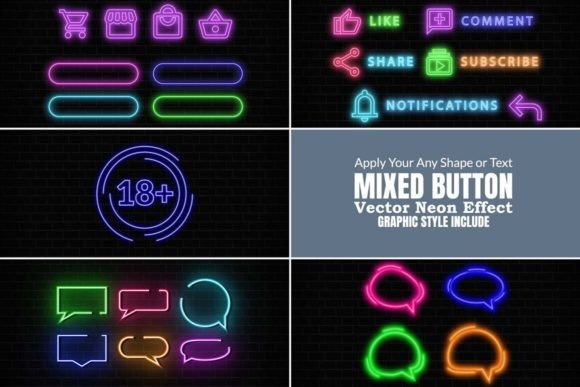
There’s a unique energy that comes with neon. It’s electric, nostalgic, and impossible to ignore. For designers and creators, capturing that vibrant glow in a digital project used to mean hours of layering, blending modes, and tweaking gradients. That process has been streamlined with the Neon Editable Vector Effect. This isn't just a static graphic; it's a dynamic design asset built for Adobe Illustrator. It’s a collection of graphic styles and pre-designed elements that allow you to apply a convincing, luminous neon effect to any text or shape with a single click. The result is artwork that feels alive, pulsing with a retro-futuristic charm that’s perfect for grabbing attention.
Understanding the Neon Editable Vector Effect
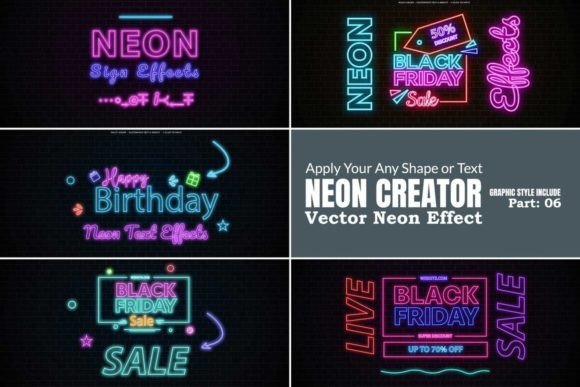
At its core, this collection is about versatility and efficiency. The package includes a range of pre-designed shapes and text treatments showcasing the effect, but its true power is unlocked when you apply it to your own creations. Think of it as a master graphic style for Illustrator. You select your vector object—a logo mark, a custom letterform, a simple circle—and apply the effect. Instantly, your flat shape transforms into a glowing tube of light, complete with realistic highlights and ambient color spills. The effect is fully editable. You aren’t locked into a single color; a few clicks can change the hue from electric blue to hot pink or emerald green. You can also swap out the underlying shapes and experiment with different included backgrounds to see how the neon interacts with various environments, from brick walls to sleek gradients.
Where This Electric Style Truly Shines
The applications for a high-quality neon effect are surprisingly broad. It’s a style that transcends specific industries, appealing to anyone looking to inject personality and modern energy into their work.
- Brand Identity and Logo Design: For a brand targeting a youthful, trendy, or entertainment-focused audience, a neon effect can become a signature element. It works exceptionally well for bar and restaurant branding, music event promotions, gaming channels, or tech startups wanting a bold, disruptive edge. Imagine a logo that glows on a dark background in a presentation or on a website header.
- Marketing and Social Media Graphics: In the fast-scrolling world of social media, static posts get overlooked. A neon-infused graphic for an Instagram story, a Facebook ad, or a YouTube thumbnail can dramatically increase stop-scroll appeal. It’s perfect for announcing sales (“Flash Sale!”), promoting podcast episodes, or creating eye-catching quote cards.
- Publishing and Editorial Design: Book covers, magazine features, and digital publication headers can leverage neon typography to set a mood instantly. It suggests genres like sci-fi, cyberpunk, contemporary fiction, or nightlife guides. For a publisher, it’s a tool to make a cover pop on a digital shelf.
- Packaging and Product Design: Product packaging for items like energy drinks, cosmetics, or specialty foods can use subtle neon accents to communicate vibrancy and excitement. A glowing logo on a dark box sleeve can create a premium, memorable unboxing experience.
- Personal and Craft Projects: The appeal isn’t limited to commercial work. Hobbyists and crafters can use these assets to create stunning party invitations, personalized wall art, or unique digital planners. The ease of use makes it accessible even for those without deep Illustrator experience.
Practical Guidance for Effective Implementation
While the Neon Editable Vector Effect is designed for simplicity, a thoughtful approach will yield the best results. Here’s how to integrate it effectively into your workflow.
First, consider your project’s context. Neon is high-contrast and high-impact. It works best as an accent or a focal point, not as body text. For readability, pair it with a clean, neutral sans serif font for supporting information. The glow effect itself can reduce legibility at small sizes, so it’s ideal for headlines, logos, and short, punchy phrases. Test your design at the intended size and on the target background—a neon effect on a white background will look and feel entirely different than on a dark one.
Second, evaluate the included styles and shapes. The package provides a fantastic starting point, but the real value is in applying the effect to your own vector artwork. Use it to elevate a client’s logo, create custom typography for a title sequence, or design unique icons for an app. The ability to change colors means you can tailor the palette precisely to a brand’s guidelines or a project’s mood board.
Finally, think about the overall design system. A neon effect is a powerful design asset, but it should complement your broader brand identity, not overwhelm it. Use it consistently across key touchpoints—like a logo, a primary call-to-action button, or a section header—to build recognition without visual fatigue. The goal is to create a striking, professional impression that feels intentional and cohesive. This collection, compatible with Illustrator CC through 2022+, is a tool that empowers you to add that electrifying spark exactly where you need it, transforming ordinary vector art into something truly memorable.